
DOWNLOAD at 4shared WITH EASY - Download files at 4shared is actually very easy, and even though we have used 4server.info or 4shared premium link generator and so on, we are still going to wait for 20 seconds, and we'll also see obstacles as shown below :

There are several causes so that the message appears at the top, among others:
««««« EASY TO DOWNLOAD IN 4SHARED.COM »»»»»
(First Step) If you do not have account, sign up in advance 4shared.com [free].


- The owner does not allow users to view files in public search results.
- The owner does not allow other users to add a file to their accounts.
- Not have a 4shared account.
- Has had a 4shared account but not in.
««««« EASY TO DOWNLOAD IN 4SHARED.COM »»»»»
(First Step) If you do not have account, sign up in advance 4shared.com [free].

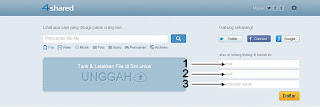
- (1) Enter your Email
- (2) Type in Password
- (3) Type in the Confirm Password
- After that, click Register

(Step Three) Verify Account. Log in Email and Open Message Log from 4shared and follow the prompts.

(Step Four) Done. You already have a 4shared account.
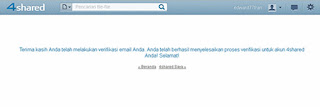
(Step Five) After having 4shared account, you can directly Download files at 4shared and also you can download files up to 15GB.
««««« EASY TO DOWNLOAD IN 4SHARED.COM »»»»»
Most Important:
Once you have a 4shared account, before Download or Stream, preferably in advance 4shared account.
To download at 4shared is actually very easy, if we follow the steps that have been supplied by 4shared. Hopefully useful and Thank You for your time and your visit.

(Step Four) Done. You already have a 4shared account.

(Step Five) After having 4shared account, you can directly Download files at 4shared and also you can download files up to 15GB.
««««« EASY TO DOWNLOAD IN 4SHARED.COM »»»»»
Most Important:
Once you have a 4shared account, before Download or Stream, preferably in advance 4shared account.
To download at 4shared is actually very easy, if we follow the steps that have been supplied by 4shared. Hopefully useful and Thank You for your time and your visit.


